

Description:
This article explains how to buy or sell a token on Gala Swap.
Purpose:
The Gala Swap Decentralized Exchange enables users to securely swap and receive tokens built on GalaChain anytime, anywhere, providing seamless access to digital token swaps on the go. This guide walks you through how to buy, sell, and swap tokens to ensure a smooth and hassle-free experience.
Assumptions made:
This article assumes the reader understands the information in the following article:
How to create and connect an Accountless GalaChain Wallet using a Web3 Wallet
What is a client| and eth| Wallet Address in the GalaChain Ecosystem
How to set up a GalaChain Mobile Wallet
How to import an existing wallet seed phrase or Gala Games Account into the Gala Wallet Application
Where To Get GALA
How to Connect a Wallet to Gala Swap
Step 1: Access the Gala Swap website and click on "Connect Wallet". <- Link to article
Step 2: Click on the drop down menu and select the tokens you wish to swap.
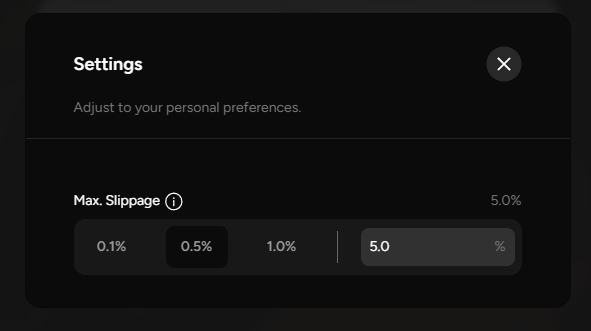
Step 3: Before continuing, you may want to adjust your slippage. Click on the gear icon in the top right.
- By default, this will be set at 0.5% which is ideal for most swaps. If you are having troubles swapping a low liquidity pair, you may need to adjust this higher. You may also enter a custom amount.
Step 5: When you are ready to swap, click on "Swap". Review the details of your transaction, and click on "Confirm Swap".
Step 6: Your web3 wallet extension should now appear with a pop up. Click on "Accept" to proceed, or "Reject" to decline.
Step 7: Congrats! Your swap has now been completed.